How I kept a Magento shop running under 600,000 scraper IPs
- security
- magento
- ddos
- ops
Last week I got a message from a client: "the shop feels slow, customers can't check out". I logged in and found the server nearly dead. Five cores, load of 22. Cloudflare was intermittently returning 502 Bad Gateway to everyone who opened the homepage.
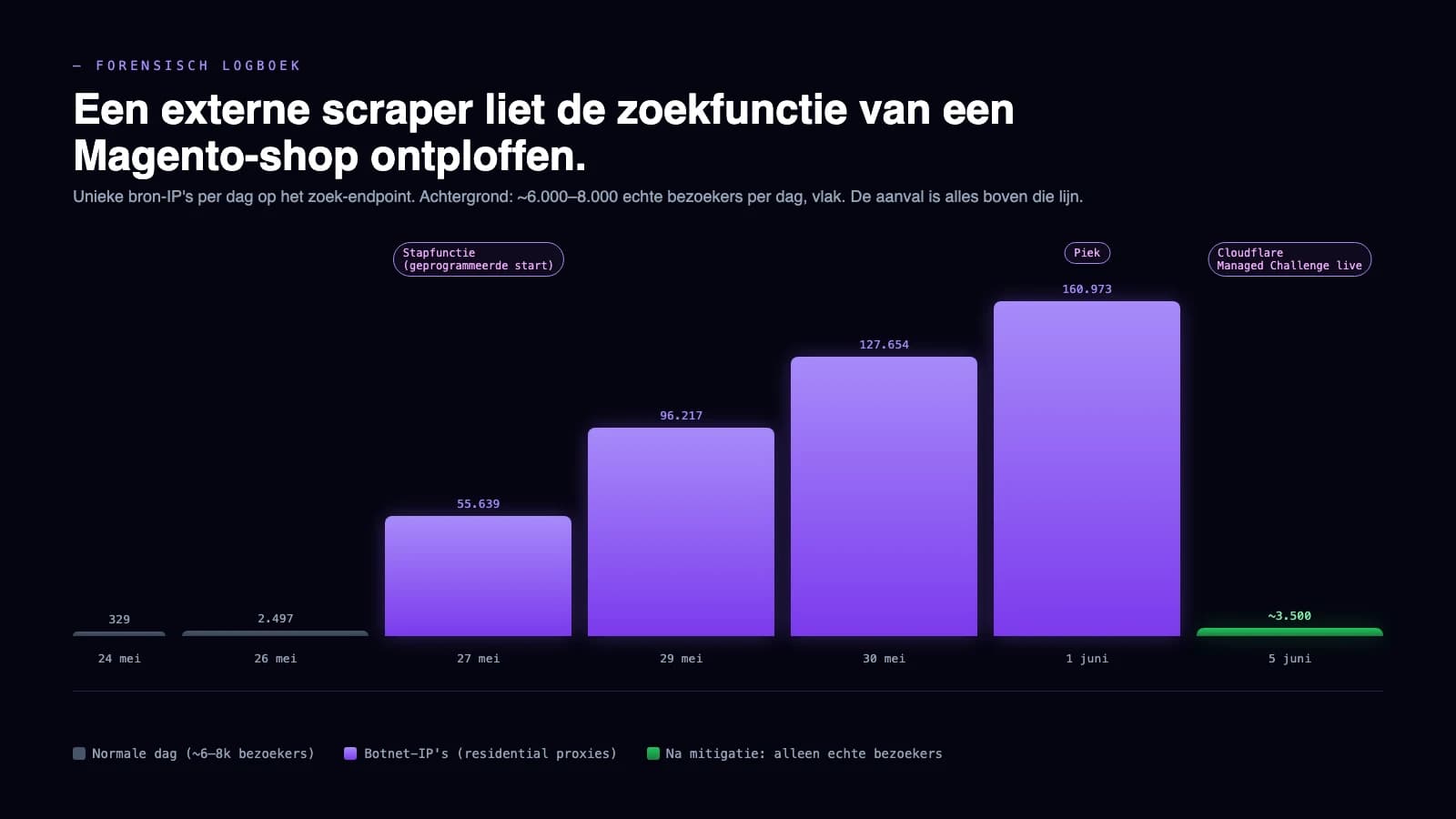
It wasn't an outage on our side. An external scraper had discovered the Magento shop's search endpoint and was hitting it with 160,000 different IP addresses simultaneously. On the peak day that was over 530,000 search requests in 24 hours. A normal day is around 8,000 real visitors. The ratio of human to bot had flipped in one shot to 4 percent human, 96 percent bot.
Below I lay out exactly what happened, what I saw in the logs, how we stopped it without locking out real visitors, and what I'd do if your shop gets hit the same way tomorrow.
What I saw in the access logs
The pattern was too distinctive to blame on an unlucky Googlebot crawl:
- 94 percent of all requests reaching the origin went to one path:
/catalogsearch/. That endpoint is the search function. Not cacheable. Every hit costs a PHP worker and an expensive Elasticsearch query. - The search terms were our own brand and product names, machine-fuzzed. Patterns like "brand productcode 500ml", "brand productcod 500ml", "bran productcode 500ml" and "brand productcode 500 ml". Thousands of permutations, systematically repeated over multiple days.
- Behind each series of requests was a different IP address. 70 percent of IPs made just two requests before rotating. 15 percent made one. No IP exceeded ten requests per minute.
- A third of the IPs were IPv6, spread across dozens of consumer and mobile ISPs worldwide. That's not a datacenter. That's a residential proxy network: rented IP access through consumer devices that usually have no idea they're being used.
The campaign started exactly at three in the morning on a Tuesday, with a jump from twelve to nearly 3,000 requests per hour. Between 23:00 and 03:00 nobody is awake to respond, and the attacker knew that.
Why this wasn't a regular DDoS
The goal wasn't to take the site down. The prize was the product data. For each request series the scraper fetched the search results page, including the prices in the product list, and paginated through to page 64. Only 4.4 percent of requests hit a product detail page directly. Everything was mined from search results.
For the attacker, 600,000 IPs aren't a problem: residential proxies are billed per GB of traffic, not per IP. For us it means classic defences don't work. Per-IP rate limiting does nothing when one IP makes just two requests per minute. Captchas in front of the search function cost us real visitors. A geoblock also locks out loyal customers in France and Belgium where the attacker paid people to share their connection.
The DDoS was a side effect. The server went down because the search function is simply the heaviest route in any Magento stack, and a thousand concurrent requests per minute break a five-core box.
What we did to stop it
First measure: Cloudflare on "Under Attack Mode". That's a JavaScript challenge in front of every visitor, and it works immediately. Load dropped from 22 to 3. But Under Attack also challenges server webhooks. Tracking callbacks from the logistics partner, payment confirmations, marketplace syncs: all blocked at the edge because a server doesn't execute JavaScript. We saw it within an hour in order processing: tracking numbers stopped coming through.
Essential lesson: don't leave a nuclear button on longer than strictly necessary.
What we did next, in this order:
- Origin rate limit on just the search endpoint, not per IP but per host. The attacker rotates IPs, so you build a budget per shop instead of per visitor. In nginx:
limit_req_zone $hostwith a burst that lets real search requests through. - Cloudflare Managed Challenge on the search URL, not site-wide. An expression like
(http.request.uri.path contains "/catalogsearch/" and not cf.client.bot)lets verified search engines through, challenges the rest. Webhooks don't hit it. /catalogsearch/set tonoindexandrobots-disallow. That shrinks the attack surface and reduces crawl budget pressure from legitimate search engines on a path that shouldn't be generating search traffic anyway.- Preserving the evidence. Nginx logs rotate out after a few days. For the police report I exported every line related to the scraper into a separate CSV, with timestamps, IPs, search terms and status codes. 1.7 million lines in one file, that's your evidence.
After the Managed Challenge, scraper hits dropped from six to ten thousand per hour down to eighty to 150 per hour. That remaining traffic was the sum of real visitors doing legitimate searches, and Googlebot.
What I'd do if it happened to your shop
Don't wait for it to blow over. A residential proxy botnet only leaves when it's no longer commercially viable to scrape your catalogue. Concretely:
Immediately, same day:
- Put Cloudflare on Under Attack Mode (or the Bot Fight Mode equivalent from your proxy) to get out of the acute pressure. Accept that webhooks will temporarily stop coming through.
- Collect access logs from the past 14 days in one place. Logs rotate, and without logs you have no police report.
- Call your hosting partner. Not to ask for help (they usually can't do anything), but to inform them that an attack is running and that their monitoring may go haywire.
Within the first day:
- Identify which endpoint is taking the attack. One
awkon your access log shows which path is pulling the top percentage of traffic. In almost every e-commerce case it's/catalogsearch/, a product filter URL, or a specific product page. - Build a per-host rate limit on that endpoint, not per IP. Per IP doesn't work with residential proxies.
- Replace the site-wide challenge as quickly as possible with a targeted challenge on that endpoint. Site-wide challenges break integrations.
Within the campaign (which usually lasts days):
- File a police report. Law enforcement can compel proxy providers in ways individual business owners can't.
- Mark the attack endpoint
noindexif it doesn't need to deliver SEO value anyway. - Restrict the read timeout on your php-fpm so one slow request can't hold a worker hostage for 15 minutes.
If your shop runs on a platform that doesn't offer these controls (Wix, Squarespace, some Shopify templates), the attack surface is smaller but your defence room is also smaller. In that case "waiting for the attacker to stop" is practically your only option, and your hosting partner will probably place a temporary ban on the offending path.
What I didn't do
Origin firewalls that only allow Cloudflare IPs are a tempting button. We don't use them, because they break your health monitor, your own SSH if you misconfigure it, and they don't solve the problem (the attacker is already coming through Cloudflare). The same goes for cargo-cult defences like block_ua on random user agents: this scraper runs the same Chrome strings as your real visitors.
What I did do is stay live in the logs the whole time while the mitigation deployed. An attacker who sees their campaign suddenly hitting a 99 percent failure rate can switch tactics within an hour. Three times in four days we adjusted the rate limit because the attacker added more IPs to the pool. A fix-and-forget approach doesn't work when someone is actively working against you.
Want to talk directly?
Is something running on your webshop right now that you don't trust, or do you want a second pair of eyes on your logs? Send me a message. I'll take a look within one working day, no sales call.
Ready to get started?
Get in touch for a no-obligation conversation about the possibilities.